Lake widgets
Put your lake on your website
Live conditions for any lake, in a box you design. Pick the lake, pick a look, choose the data, and paste one line of code. It keeps itself up to date.
- Step 1
Pick a lake
Any of the lakes on LakeMonster.
- Step 2
Make it yours
Five layouts, colors, your own photo behind it.
- Step 3
Paste the code
One line. Works on any website.
Widgets are free. They are made from a LakeMonster account, so you can come back and change them, and a free account is all you need.
Five looks, drawn with your lake’s real numbers
A lake widget is a small box of live lake conditions for your own website: a marina home page, a fishing guide’s booking page, a cabin or boat rental listing, a campground, a club or a town site. Every look can be resized and recolored.

Card
The classic box for a sidebar or a contact page: temperature, sky, water, wind and the next days.
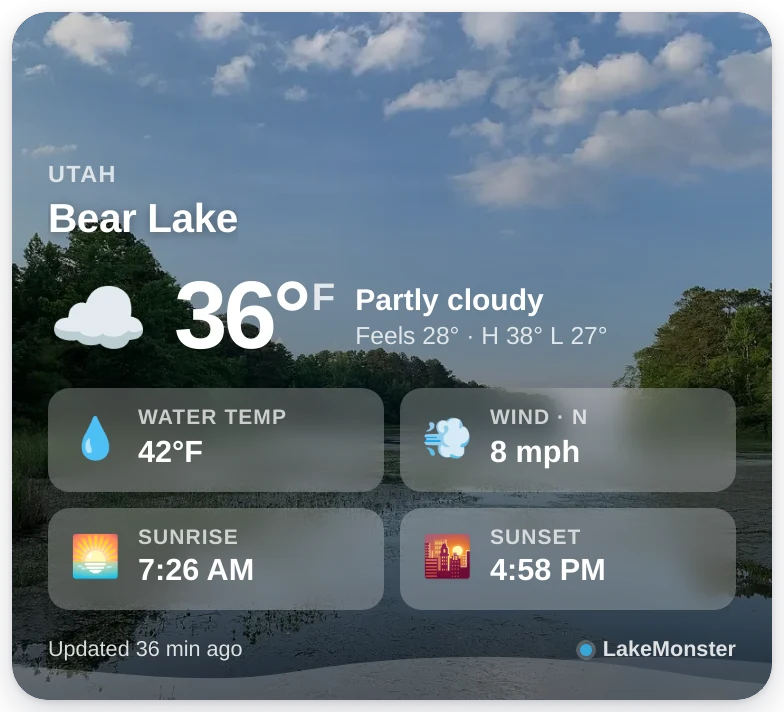
Photo
Your own photo, or the newest satellite picture of the lake, behind the numbers, with shading you control.

Banner
Wide and short, made for the top of a home page or a booking page.

Badge
A small badge that fits a header, a footer or a listing.

Ticker
One sliding line of conditions for a narrow strip.
Lake data you can turn on
Show one number or all of them. The widget reads the same lake conditions as the lake’s page on LakeMonster.
- Air temperatureWhat it is now, the sky, how it feels, and today’s high and low.
- Water temperatureThe latest surface reading for the lake, with its date when it is not from today.
- WindSpeed, gusts and the direction it blows from.
- ForecastHighs, lows and sky for the next two to five days.
- Sunrise and sunsetIn the lake’s own time zone.
- HumidityPercent, right now.
- UV indexHow strong the sun is.
- Water levelHow full the lake is, for lakes with level data.
- Lake factsSurface area, greatest depth and elevation.
Questions about lake widgets
What is a LakeMonster lake widget?
A small box of live lake conditions that you put on your own website. You choose one lake (or up to four that take turns), a layout, the colors and the data to show, such as air and water temperature, wind and the forecast. LakeMonster gives you a short piece of code to paste, and the widget keeps itself up to date.
How much does a lake widget cost?
Lake widgets are free. You need a LakeMonster account to make and manage them, and a free account is enough. One account can have up to 25 widgets.
How do I add the widget to my website?
Sign in, open Widgets from your profile menu, press New widget, pick your lake and design, then save. Copy the code and paste it into your page where the widget should appear. It works in WordPress, Squarespace, Wix, Shopify, Webflow and any site that accepts HTML. Site builders that do not allow scripts can use the plain iframe version of the same code.
Which lakes can a widget show?
Any lake on LakeMonster: lakes and reservoirs across the United States and in many other countries. Each widget shows one lake. Make another widget for another lake.
How fresh is the data in the widget?
Weather in the widget is refreshed when it is more than two hours old, and a widget that stays open on a page reloads its numbers every ten minutes. Water temperature shows the latest reading for the lake and says its date when it is not from today.
Can I match the widget to my own website?
Yes. There are five layouts and six color themes, including your own colors. You can upload a background photo, darken or blur it, make the background see-through, and set the width, height, text size, corner roundness and lettering. Design changes you save later reach your site without pasting the code again.
What does the widget key give access to?
Each widget has its own key. The key opens only that widget: its design and the data fields you chose for its one lake. It cannot read other lakes or anything in your account, and you can replace it at any time, which stops the old code from working.
Will the widget slow my page down or affect my search ranking?
The widget loads after your page, in its own frame, so it does not hold your page up and cannot change your page’s styles. The code also puts a plain text link to the lake’s LakeMonster page on your page, so visitors and search engines can read what the box shows.
Can I build my own display with the widget data?
Yes. Every widget has its own key, and the same key reads that lake’s data as JSON from api.lakemonster.com, so you can draw it your own way on a website, a screen or an app. One rule: anything that shows the data must show the LakeMonster logo next to it, linked to the lake’s page on lakemonster.com. The widget page gives you that logo and link as code to copy and paste.
Looking for the lake itself? Browse every lake or open the lake map. Own a shop, marina or guide service? List your business on LakeMonster too.